
Multi-Step Booking Checkout for Studios That Need More Than a Calendar
Reviewed by StudioDock product team. Last updated May 21, 2026.
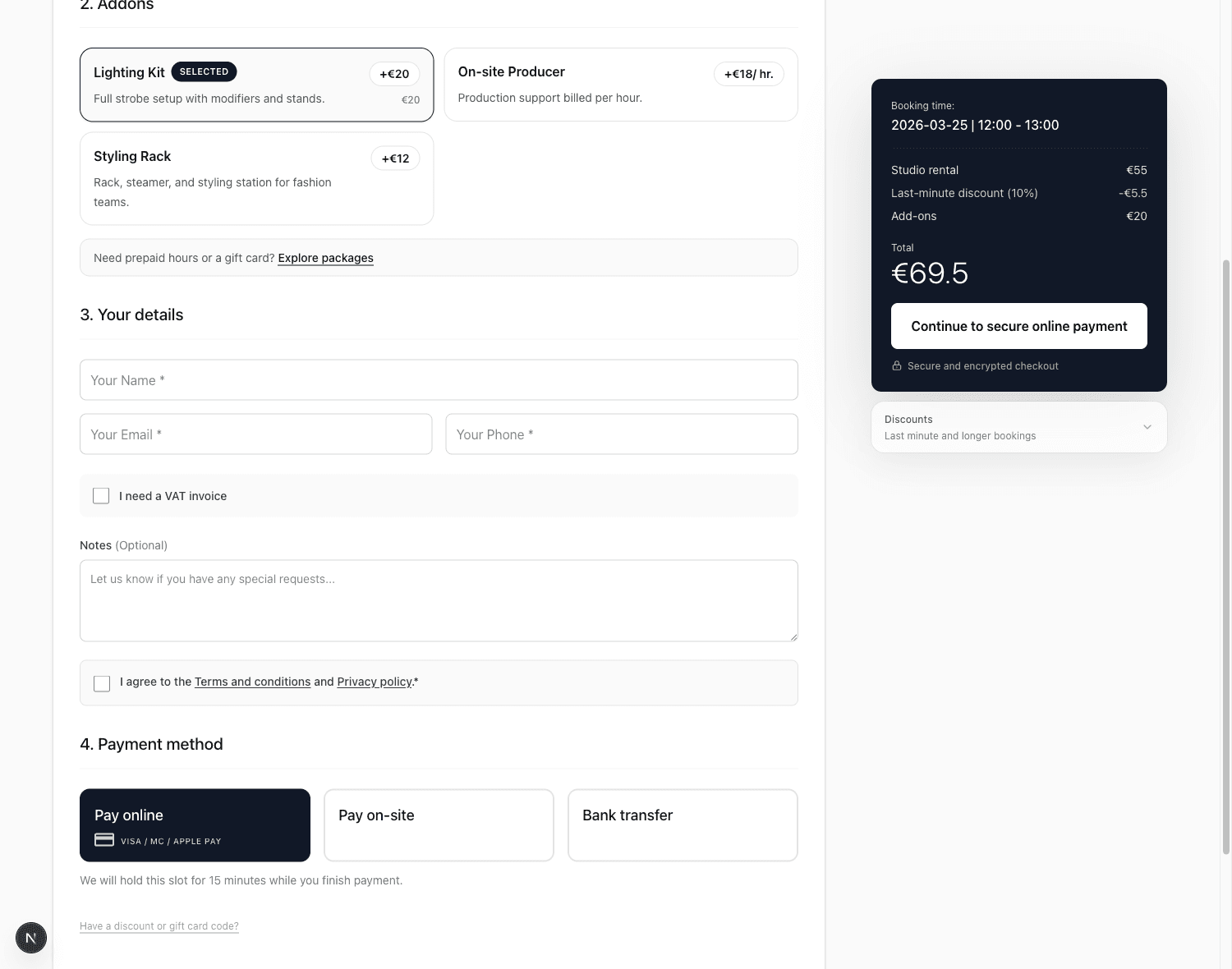
A booking checkout for studios has to do more than collect a date and an email address. A client may need to choose a room, understand the total price, add lighting or production support, use prepaid hours, apply a gift card, and pick the right payment method before the booking is safe to confirm.
For simple rentals, a one-page booking form is still the fastest path. But higher-consideration studio bookings often convert better when the form guides the client through one decision at a time. StudioDock Spaces now supports both patterns: the existing one-page checkout and a new multi-step booking checkout template.
Why Studios Need a Checkout Template Choice
Studio booking is not the same as a salon appointment or a generic calendar slot. A photo studio might sell two hours, a cyclorama, a lighting kit, and a producer. A podcast room may include staff routing or equipment rules. A repeat client may have prepaid hours or wallet credit. A venue may need clear tax and payment context before the client commits.
Putting every decision on one page keeps the flow compact, but it can also make the page feel dense when the studio has many options. Splitting the checkout into steps can reduce decision load without removing revenue features.
- One-page checkout remains best for simple studios with minimal add-ons and clients who already know what they want.
- Multi-step checkout is better when the client benefits from a guided path: time first, then add-ons, details or portal sign-in, wallet credit, and payment.
The important part is that the studio can choose. This is not a forced redesign for every tenant.
How the Multi-Step Spaces Checkout Works
The new template keeps the same StudioDock booking engine underneath. Availability, pricing, add-ons, staff requirements, wallet credit, gift cards, promo codes, tax, deposits, and payment methods all continue to use the existing checkout logic.
The difference is the customer experience. On desktop, the booking form now gives the client a guided sequence with a sticky order summary. The first step uses a visual calendar for date selection and keeps start time and duration together. Add-ons appear as cleaner selectable rows with images when available. The final steps keep credit, payment, and terms close to the total.
Returning clients can sign in through the customer portal. When StudioDock can prefill their saved contact profile, the checkout skips the details step instead of asking them to repeat information. The legal agreement still requires an explicit checkbox before booking.
Revenue Features Stay in the Flow
A guided checkout should not mean a weaker checkout. The multi-step template keeps StudioDock's revenue features visible at the right point in the decision.
- Add-ons remain part of checkout, including staffed add-ons that require a team member selection.
- Booking Plans can still shape pricing, included add-ons, and staff requirements.
- Wallet credit and prepaid hours appear when the client email has eligible active credit.
- Gift cards and promo codes still apply before payment and update the order summary.
- Deposits and payment methods continue to follow the tenant's existing settings.
This matters because studios should not have to choose between a cleaner checkout and the features that raise average order value or support repeat clients.
What Changes for Existing Studios
Nothing changes automatically for studios that stay on the one-page template. The existing checkout remains supported and uses the same route, checkout API, pricing rules, tracking, and embed mode.
The new option lives in Settings, so a tenant can test it locally or with a demo booking path before sending real clients through it. This checkout template applies to Spaces; the former Sessions product is no longer available.
When to Use Multi-Step Checkout
Multi-step checkout is most useful when the booking has enough context that the client needs a guided path.
- Photo and video studios with several equipment or support add-ons.
- Podcast and recording spaces that sell rooms plus production support.
- Studios with prepaid hour packages, wallet credits, memberships, or gift cards.
- Spaces with booking plans, tax display, deposits, or multiple payment choices.
- Studios that want clearer customer portal sign-in for repeat clients.
If the booking is very simple, the one-page template may still be the right choice. A good checkout should match the buying decision instead of forcing one layout everywhere.
Getting Started
Open StudioDock admin, go to Settings, and choose the Spaces checkout template from the branding settings. Keep the existing one-page checkout for a compact form, or switch Spaces to the multi-step template when you want a more guided customer journey.
After switching, run a test booking as a new client and as a returning portal client. Check add-ons, packages, gift cards, promo codes, and payment method display before sharing the link.
You can also review the public booking and checkout capabilities from the StudioDock features page.
Ready to upgrade your studio?
Join the creative spaces switching to StudioDock to maximize every booking hour.
Start your 7-day free trial